
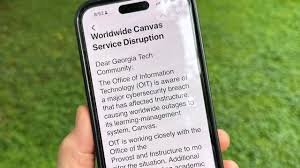
Is Your Canvas Learning Platform Account Secure? Understanding Cybersecurity Risks and Hacks
In an era where digital classrooms have become the norm, the Canvas learning platform has emerged as one of the most popular Learning Management Systems (LMS) globally. However, as education migrates online, it becomes a prime target for cybercriminals. From student data breaches to unauthorized access, the threat of a cybersecurity hack is a reality that both students and educators must face.
But how vulnerable is your account? And more importantly, what can you do to ensure your grades, personal information, and intellectual property remain safe?
The Growing Threat to EdTech Platforms
Educational technology (EdTech) often handles vast amounts of sensitive data, including full names, email addresses, and financial records. Because many students use simple passwords or reuse credentials across multiple sites, hackers often find an easy entry point into the Canvas ecosystem.
Most “Canvas hacks” aren’t actually breaches of the platform’s core infrastructure—which is maintained by robust security protocols by Instructure—but rather account takeovers resulting from poor individual security habits.
Common Vectors for Canvas Cybersecurity Hacks
Understanding how hackers operate is the first step in prevention. Here are the most common methods used to compromise Canvas accounts:
- n
- Phishing Scams: Fraudulent emails that look like official Canvas or university notifications, tricking users into entering their login credentials on a fake page.
- Credential Stuffing: Using passwords leaked from other website breaches to try and gain access to Canvas accounts.
- Social Engineering: Manipulating users into revealing sensitive information through deceptive conversations.
- Malware and Keyloggers: Malicious software installed on a student’s computer that records every keystroke, including passwords.
How to Protect Your Canvas Account from Attacks
You don’t need to be a tech expert to secure your digital learning environment. Follow these essential cybersecurity best practices:
1. Enable Multi-Factor Authentication (MFA)
MFA is your strongest line of defence. By requiring a second form of verification (like a code sent to your phone), you ensure that even if a hacker steals your password, they still cannot access your account. Check your institution’s settings to see if NIST-standard authentication is enabled.
2. Create Complex, Unique Passwords
Avoid using “Password123” or your birthdate. Use a combination of uppercase letters, numbers, and special characters. We highly recommend using a reputable password manager to generate and store unique keys for every platform you use.
3. Be Skeptical of Unexpected Emails
If you receive an email asking you to “verify your account” or “urgent action required” regarding your Canvas profile, do not click the link. Instead, navigate directly to the official Canvas URL in your browser.
What to Do If You Suspect a Hack
If you notice unusual activity—such as changed passwords, messages you didn’t send, or modified assignment submissions—act immediately:
- Change your password instantly across all linked accounts.
- Contact your institution’s IT help desk to report the breach.
- Review your account settings to ensure no unauthorized email addresses or phone numbers were added for recovery.
- Scan your device for malware using a trusted antivirus program.
Conclusion
While the Canvas learning platform provides powerful tools for education, the responsibility of security is a shared effort. By staying vigilant and implementing basic cybersecurity measures, you can protect your academic journey from the disruption of a hack.
Stay safe, stay secure, and keep focusing on what really matters: your learning!



