
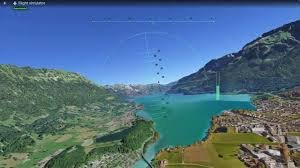
Experience the World from Above: The Google Earth Flight Simulator is Now on the Web
Have you ever dreamed of soaring over the Great Wall of China, gliding through the skyscrapers of New York City, or exploring the rugged peaks of the Himalayas? Thanks to the Google Earth Flight Simulator, that dream is now just a few clicks away—and the best part is, you don’t even need to download a single app.
Google has officially brought one of its most beloved “hidden gems” to the web. Previously, this immersive experience was tucked away in the desktop software, requiring a full installation. Now, Google has integrated this powerful tool directly into the browser, making virtual aviation accessible to everyone with an internet connection.
Why This is a Game-Changer for Virtual Exploration
While professional titles like Microsoft Flight Simulator offer ultra-realistic cockpit experiences and complex physics, the Google Earth version focuses on accessibility and fun. It leverages the massive library of 3D aerial photography and geospatial data that Google Earth has spent years collecting, allowing you to navigate the globe in real-time.
Step-by-Step: How to Launch Your Flight
Getting into the cockpit is simple. Just follow these quick steps to start your journey:
- n
- Step 1: Head over to the official Google Earth website.
- Step 2: Select the “Explore Earth” option.
- Step 3: Locate the “Tools” menu on the toolbar.
- Step 4: Scroll down and click on “Flight Simulator.”
Mastering the Controls: Tips for New Pilots
If you’ve never flown a virtual plane before, be warned: the learning curve can be a bit steep! Many users have reported that maneuvering the aircraft takes a bit of trial and error. Here is a quick cheat sheet to help you stay airborne:
- Steering: Use the Up, Down, Left, and Right arrow keys on your keyboard to control the plane’s pitch and roll.
- Speed Control: Use the Page Up and Page Down keys to adjust your velocity.
- Alternative Speed Control: If your keyboard lacks Page keys, simply click the power gauge located on the right side of your screen.
Pro Tip: Don’t panic if you end up in a permanent barrel roll or crash into a mountain! Since this is an experimental feature, you can simply restart the simulation and try a different approach.
Final Verdict
The addition of the Google Earth Flight Simulator to the web version is a fantastic move by Google to make their professional geospatial tools more engaging. Whether you are a geography enthusiast or just someone looking to kill a few minutes with a virtual adventure, this tool offers a unique perspective of our planet.
So, where will you fly first? Clear the runway and start exploring today!



