
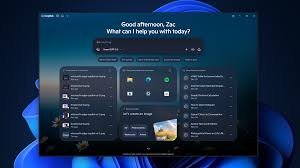
Streamline Your Workflow: Microsoft Copilot Introduces Built-In Web Browsing
For millions of users, the friction of jumping between an AI chatbot and a web browser has always been a minor productivity killer. You ask a question, get a link, switch apps, read the content, and then switch back to refine your prompt. Microsoft is looking to end this cycle by integrating a built-in browser directly into the Copilot app.
This strategic update aims to create a more seamless ecosystem where chatting with AI and consuming web content happen in a single, unified space. Whether you are on Windows or Mac, the goal is clear: keep you immersed in the Copilot experience.
What Exactly is the Copilot In-App Browser?
Initially tested in March, the broader rollout of this feature is scheduled for late November. Instead of launching your default browser (like Chrome or Firefox) when you click a link, Copilot will now open the website within its own interface.
Key features of this integration include:
- n
- Side-by-Side View: Open websites directly next to your chat window for real-time referencing.
- Tab Management: Manage multiple open pages without leaving the app.
- Full-Screen Toggle: Easily switch between a compact view and a full-page experience.
- Local Data Storage: Similar to Microsoft Edge, data is stored locally to ensure performance and security.
The Battle for User Habits
While this might seem like a simple UI tweak, it represents a larger strategic move by Microsoft. By reducing the need to exit the app, Microsoft is attempting to change fundamental user habits. If you can find the answer, verify the source, and execute a task all within Copilot, there is less incentive to return to a traditional browser start page.
We see similar patterns in apps like Microsoft Teams, X (formerly Twitter), and Reddit, where in-app browsers are used to keep engagement high. Furthermore, Google has seen success with this approach on mobile devices via Gemini, often leading users away from their default mobile browsers.
Will it Change How You Work?
The real question is whether users will embrace this integrated workflow or stick to the classic “multi-window” approach. For those who already rely on Microsoft Copilot for research and coding, this update is a massive win for efficiency. For others, it may be the nudge needed to move away from the traditional sidebar and treat Copilot as a standalone productivity hub.
As AI continues to evolve, the boundary between the “browser” and the “assistant” is blurring. Microsoft isn’t just building a tool; they are building a new way to interact with the internet.
Stay tuned for more updates on the latest AI innovations from Microsoft and how they are reshaping the PC landscape.



